 Life RPG — The Gamified Notion Life Planner - Max
 Subtotal: $99.00
Sale!

What is Life RPG?
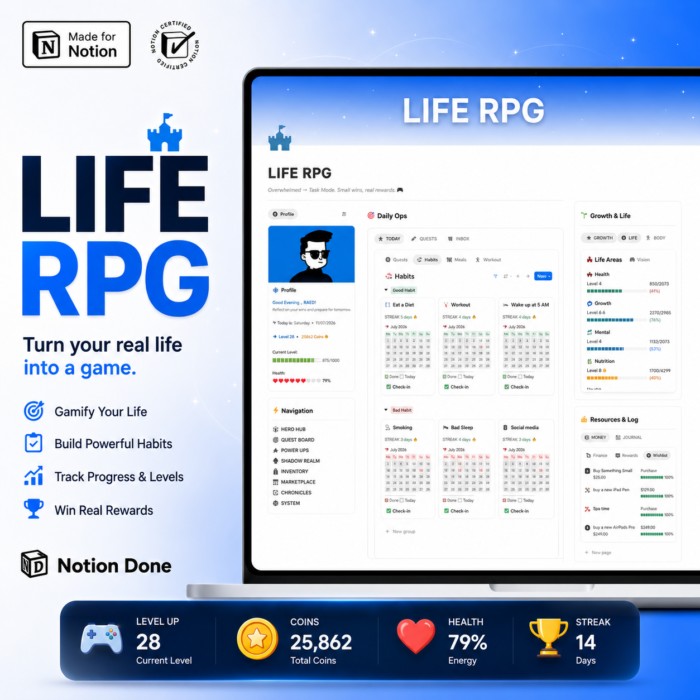
Life RPG is a gamified Notion life operating system. Every task you finish, habit you keep, and goal you hit earns XP and coins — so progress becomes visible, motivating, and genuinely fun. It’s a complete system for running your whole life, not just a single tracker.
Why most planners fail (and this one doesn’t)
Most planners run on guilt. You set goals, miss a few days, feel bad, and quit. Life RPG flips the loop: every action earns XP and coins you can spend on real rewards. Motivation is built into the system with levels, streaks, and rewards — so momentum keeps you going instead of willpower.
What’s inside
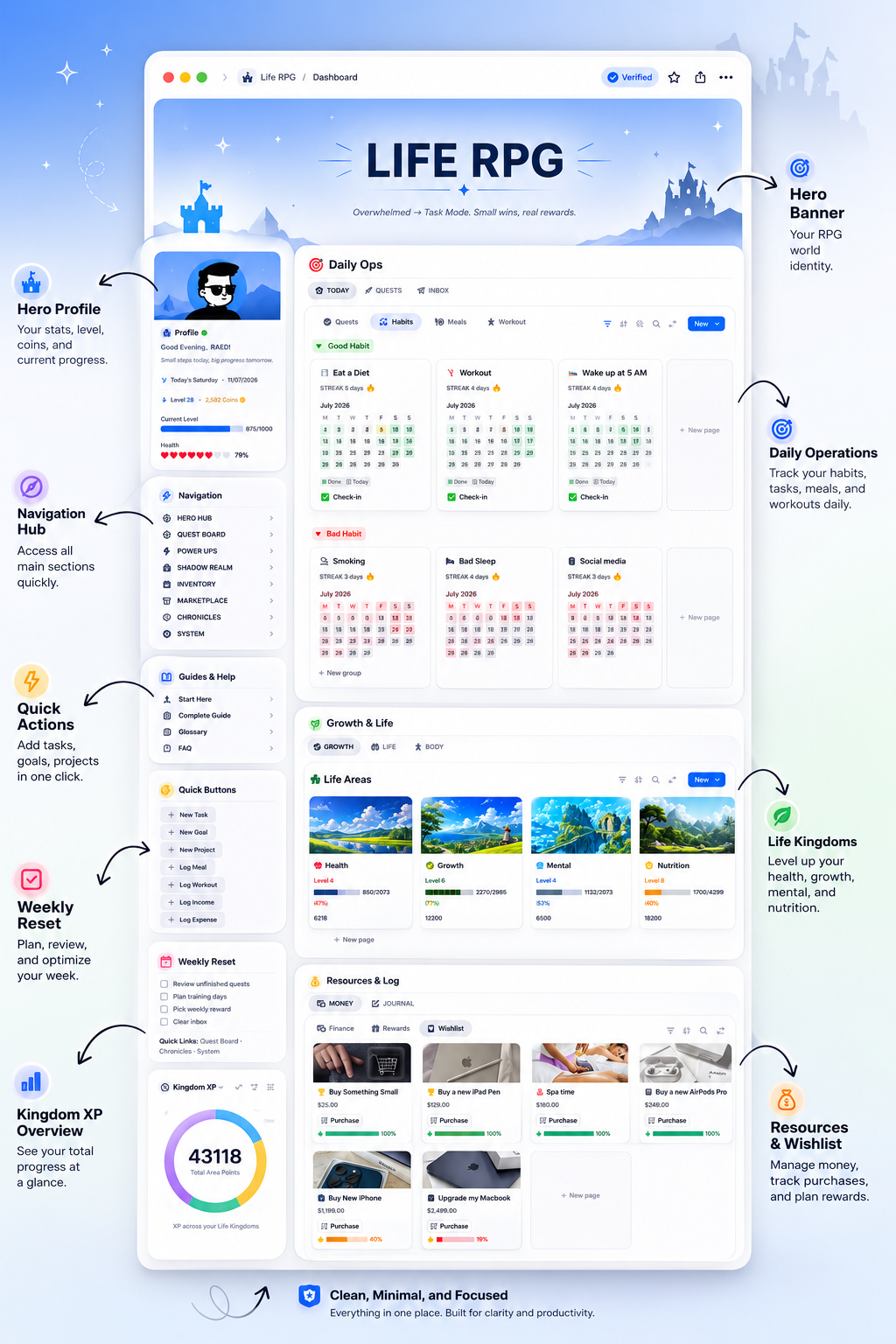
- See your whole life at a glance — HERO HUB with your hero card, level, XP, coins, and stats.
- Build habits that stick — turn daily habits into repeatable quests with streaks and rewards.
- Balance every area of life — Life Areas (Kingdoms) like Health, Work, Money, Growth, and Relationships, so nothing gets neglected.
- Grow on purpose — POWER UPS for skills, books, and resources.
- Reflect and stay grounded — CHRONICLES for journaling, mood log, and long-term vision.
- Run it like a system — SYSTEM built on PARA (Projects, Areas, Resources, Archives).
- Start in minutes — demo data and a step-by-step guide included.
How it works
- Set your Life Areas (Kingdoms) — choose 5–8 areas of life to level up.
- Do quests & habits — complete tasks and daily habits to earn XP and coins.
- Cash in rewards — spend coins on real-life treats in the Marketplace and watch each area level up.
Life RPG vs. Habit RPG vs. ADHD OS
| Life RPG | Habit RPG | ADHD OS | |
|---|---|---|---|
| Best for | Your entire life, gamified | Building habits only | Focus & overwhelm |
| Scope | Goals, habits, tasks, areas, rewards | Habits + streaks | Tasks, focus, low-overwhelm flow |
| Gamification | Full (XP, coins, quests, rewards) | Light (habit XP) | Optional |
| Ladder role | Flagship life OS | Focused tool | Niche OS |
Frequently asked questions
What is Life RPG?
Life RPG is a gamified Notion life planner that turns your goals, habits, and tasks into quests, XP, coins, and rewards. It’s a complete life operating system where finishing real tasks levels up both your character and your life.
Do I need Notion experience?
No. Life RPG comes with demo data and a step-by-step guide. If you can duplicate a page and type, you can use it — everything is pre-built and connected.
How do XP, coins, and rewards work?
Every task, habit, and goal you complete earns XP and coins. XP raises your level and your Life Areas; coins are spent on real rewards you define in the Marketplace.
How is it different from Habit RPG and ADHD OS?
Habit RPG focuses only on habits. ADHD OS is tuned for focus and overwhelm. Life RPG is the full life OS that gamifies goals, habits, tasks, areas, and rewards together.
Does it work on free Notion and mobile?
Yes. Life RPG runs on the free Notion plan and works on desktop and mobile, though the larger dashboards are easiest to set up on desktop.
Is it a one-time purchase?
Yes. Pay once, duplicate it into your workspace, and keep it forever — including future updates.
Can I customize it?
Completely. Rename Life Areas, add quests, change rewards, and adjust the system to fit how you actually live.
Level up your real life today
| Variable | Free Preview, Max |
|---|
177 reviews for Life RPG — The Gamified Notion Life Planner
Only logged in customers who have purchased this product may leave a review.

Ben Lee –
This Notion Life Planner is visually pleasing and functional. It’s rare to find something that looks this good and is also genuinely useful for daily life.
Emma Johnson –
This planner made Notion feel less intimidating. Instead of designing each database from scratch, I could start with a ready-made setup that already works.
Helena Costa –
I love that the template doesn’t force a specific lifestyle. Whether you’re a student, a parent, or self-employed, you can plug your life into it without much modification.
Daniel Novak –
I used to keep my grocery lists, appointments, and goals in different apps. Now they all live inside this Life Planner, and that alone reduced a lot of mental clutter.
Hiroki Yamamoto –
The life planner helped me build a sustainable routine rather than a rigid schedule. I can shift things around when needed without breaking the whole system.
Jonas Lind –
I really like the aesthetic of this planner. It feels modern and clean, which makes opening it each morning a small pleasure instead of a chore.
Chloe Adams –
As someone completely new to Notion, I found this Life Planner surprisingly accessible. The structure is straightforward and helped me understand how powerful Notion can be.
Olivia Brown –
Even if you don’t customize it heavily, the default structure is more than enough to get started. I used most of the template as-is for the first month and only later started tweaking small details. You don’t have to be a Notion expert to benefit from it.
Olivia Brown –
I like that the system doesn’t require perfection. Missed quests are easy to reschedule, and I don’t feel punished for having off days.
Nora Schmidt –
I used to spend more time planning than doing. With quests and XP, I now focus on execution. Planning still happens, but it’s framed around action, which keeps me from getting stuck in endless planning loops.
Sofia Petrov –
I’ve tried habit trackers before, but I always stopped using them after a week. With this template, my morning routine finally stuck, because I want to keep my streak and push my character to the next level. The combination of streaks, quests, and XP is exactly what my brain needed.
Sofia Petrov –
I’m a big RPG fan, so this system feels natural. It uses core game mechanics but applies them to real-life progress in a way that doesn’t feel cheesy.
Sofia Ivanova –
I’ve tried habit trackers before, but I always stopped using them after a week. With this OS, my routines finally stuck because they’re part of a bigger system that I open every day.
Soo-jin Lee –
I’m a freelancer with an irregular schedule, and the system still works well for me. A friend with a 9-5 job also uses it and finds it helpful. The flexibility of quests, categories, and XP values means it’s easy to adapt to different lifestyles.
Soo-jin Lee –
Using the Life RPG mechanics for my fitness journey has been surprisingly effective. I track workouts as quests and see clear progress over weeks and months.
James Walker –
My partner and I share the same Life RPG workspace and treat some goals as co-op quests. It’s surprisingly fun to complete missions together and see our shared progress. It’s also a playful way to keep each other accountable without nagging.
James Walker –
The template turned my year into a long campaign. Each quarter has its own theme and set of quests, which makes long-term planning feel like storytelling.
James Cooper –
My partner and I use parts of the OS to plan our household tasks and shared goals. It keeps things transparent and reduces misunderstandings.
Julia Novak –
For me, this Life RPG template replaced my classic planners and calendar apps almost completely. It still respects deadlines and responsibilities, but the framing is more engaging. I wish I’d discovered this style of planning earlier.
Lucas Meyer –
I love tracking my skills as separate attributes, like creativity, discipline, and communication. Seeing each one level up over time as I complete related quests gives me a tangible sense of growth instead of vague self-improvement.
Lucas Meyer –
The template helped me see which areas of my life were being ignored. Once I filled in all the categories, I noticed how little attention I was giving my relationships and hobbies.
Luca Weiss –
The weekly planning page became a staple in my workflow. It’s quick to fill out and gives me a realistic view of what I can actually accomplish.
Madison Clark –
I used to wait for perfect conditions before starting anything. Now I just pick a small quest and complete it, which gets me moving. The system encourages tiny steps that accumulate into real progress over time.
Emily Foster –
I tested the system with a small team project, and it worked surprisingly well. We each had our own quests and shared milestones, and tracking progress felt more transparent and fun. It might not replace full project management tools, but it’s a great complement.
Anna Rossi –
I bought the template to simplify my planning, and it delivered exactly that. My notes, tasks, and appointments are now organized in a way my brain finally understands.
Ryan Cooper –
If you grew up playing RPGs, you’ll immediately understand how this system works. Stats, XP, quests, and levels feel familiar, but now they’re connected to your real life. It bridges my love for games with my desire to actually improve myself.
Ryan Cooper –
As a student, I use the Life OS pages to manage lectures, assignments, and exams. Having everything linked to my weekly view helps me stay on top of deadlines.
Ethan Brown –
I appreciate how the planner includes both short-term and long-term views. Daily, weekly, monthly, and yearly pages work together rather than feeling like separate tools.
Anders Lund –
I enjoy customizing reward tiers based on effort. High-difficulty quests unlock bigger rewards, which makes tackling them more appealing. It adds another layer of strategy to how I plan my weeks.
Daniel O’Connor –
The organization is beautiful and once you understand it, everything clicks. However, if you’re completely new to Notion or gamified systems, the initial setup might feel a bit complex. After watching the walkthrough and adjusting a few views, it became one of the most powerful planners I’ve ever used.
Daniel O’Connor –
Managing tasks used to feel empty and repetitive. With Life RPG, each day looks like a mini adventure, and that makes me far less likely to give up halfway.
Daniel O’Brien –
The organization is beautiful and once you understand it, everything clicks. However, if you’re completely new to Notion or systems, the initial setup might feel a bit complex. After a few days it becomes natural.
Nina Horvath –
The way the template uses linked databases and filters is really clever. It lets me see quests by area of life, difficulty, and timeline without duplicating data. That level of organization makes it feel professional despite the playful theme.
Nina Horváth –
I paired this template with my existing calendar and email tools, and now it feels like I have an actual control center for my life instead of random apps.
Noah Parker –
I started using Life RPG for creative work like writing and drawing. Assigning XP to each creative session makes it feel like I’m leveling up my skills over time. I no longer wait for inspiration; I just open my quest board and complete a creative mission.
Noah Parker –
Self-improvement always felt vague to me, but this system made it concrete. I can see exactly which quests build which skills, and that clarity is priceless.
Noah Collins –
I never had a clear life overview before this. Seeing my goals, routines, and projects in one place made it obvious why I felt scattered. Now everything has context.
Sara Lind –
My mornings used to be chaotic and unplanned. Now I start each day by reviewing my quests and picking my top missions. That simple habit made my mornings feel more intentional and less reactive.
Marta Kowalski –
The template finds a great balance between being fun and being structured. It’s playful enough to keep me engaged, but still serious about tracking goals, deadlines, and responsibilities. It replaces my old planners and doesn’t feel childish, which was a concern I had with gamification tools.
Marta Kowalski –
The quest categories and difficulty flags keep my days from becoming overloaded. I can visually see when I’m trying to do too many hard things at once.
Marta Zielinski –
The OS finds a great balance between being structured and being flexible. There’s a clear logic, but I can still tweak it to match how my brain works.
Cole Mitchell –
Framing my life as an RPG where I’m the main character might sound cheesy, but it genuinely changed how I show up every day. I feel more responsible for my actions because they directly shape my character’s journey.
Emma Wilson –
The template is super complete without being overwhelming. There are pages for goals, daily planning, finances, meals, and more, but I can easily hide the ones I don’t need.
Nico Laurent –
The system tracks a lot of information, which some people will love, but for me it felt slightly too detailed. I ended up hiding a few views and simplifying my quests. After that, it worked better, but I think minimalists might need to trim it down.
Nico Laurent –
The template works surprisingly well for family life. We track chores, appointments, and shared goals inside the planner, and everyone knows what’s happening.
Marie Olsen –
Overall, this Life Planner gave me the foundation I needed to take Notion seriously as my main planning tool. I highly recommend it if you want everything in one place.
Ingrid Olsen –
I was worried that a gamified system might feel childish or gimmicky. Thankfully, this Life RPG template strikes a mature tone while still being playful. It respects serious goals while keeping the process enjoyable.
Luca Rossi –
The way this Life RPG breaks down habits into repeatable quests is brilliant. I set up daily, weekly, and long-term quests inside Notion, and now I can visually see my character growing as I stay consistent. My gym streak and reading habit have finally stuck because I don’t want to lose my streak or miss out on XP.
Luca Rossi –
This Life RPG system helped me break out of a long period of procrastination. Small actions feel meaningful when they’re part of a larger ‘campaign’ for my life.
Luca Romano –
What surprised me most is how fast I adapted to this setup. The structure is clear, and I didn’t need to fight the template to fit my workflow. It gave me a solid backbone for my life without feeling restrictive.
Henry Adams –
Using the quest log as an anchor for daily reflection has been really helpful. I review what I did, update XP, and decide what kind of quests I want to focus on tomorrow. It keeps me intentional without feeling heavy.
Marta Alvarez –
The instructions were clear enough that I never felt stuck. I duplicated the template, followed the guide, and filled in my data until it felt like my own planner.
Laura Rossi –
The reward system might be simple, but it’s surprisingly satisfying. Assigning small real-life rewards to certain quest milestones makes me feel like I’m unlocking achievements. It keeps the whole experience enjoyable instead of rigid.
Laura Rossi –
I love the quarterly review pages. They help me step back, see the bigger picture, and adjust my plans in a structured way.
Marie Laurent –
The habit tracker section is my favorite part. It’s simple, visual, and easy to update. Seeing my streaks inside the same place where I plan my day is very motivating.
Chloe Martinez –
I tend to overthink my to-do list and feel overwhelmed. This Life RPG approach simplified everything into clear quests with difficulty ratings. I just open the board, pick a medium or easy quest, and execute. My anxiety around productivity has gone down because it’s framed as a game instead of a chore list.
Chloe Martinez –
This template is user-friendly and fun to explore. Even just scrolling through the quest board makes me want to take action and earn some quick XP.
Chloe Garcia –
I’m still new to Notion, but this template made it much easier to get started. The structure guided me toward a better workflow and taught me how databases work without needing a course.
Kevin Hughes –
As a designer, I use quests to manage creative sprints and feedback rounds. It keeps me from getting lost in endless iteration because I assign clear missions with deadlines and XP rewards. My projects move forward more reliably now.
Hannah Lee –
I was stuck in a cycle of planning but not doing. The Life RPG approach broke that pattern because it made taking action more rewarding than just thinking. Completing quests and watching my XP grow gave me momentum I haven’t felt in years.
Hannah Lee –
The OS includes enough structure for business use. I track client work and personal goals inside the same system and still feel organized.
Elena Kovacs –
I’ve tested a few bestseller planners, and this one is easily in my top picks. It feels refined, not rushed, and you can tell the creator cares about the user experience.
Connor Hayes –
The system encourages small daily wins instead of only giant milestones. That mindset shift helped me appreciate progress even on days when I can’t tackle huge projects. It’s healthier and more motivating long-term.
Connor Hayes –
The combination of dashboards, filtered views, and review prompts creates a powerful system. I spend less time organizing and more time actually doing the work.
Rachel King –
Instead of reacting to whatever pops up, I now check my quest board and focus on the missions that align with my main goals. That shift in focus helped me reduce busywork and spend more time on meaningful tasks.
Giulia Bianchi –
I use the RPG structure not just for habits but also for side projects and freelance work. Breaking big projects into quests with rewards makes it easier to see how each small step contributes to the bigger picture. My productivity and consistency have both improved since I switched to this system.
Giulia Bianchi –
The design is clean, which matters for something I use every day. It feels like a proper dashboard, not just a novelty setup.
Giulia Ferrara –
I use the OS not just for habits but also for side projects and freelance work. Breaking big projects into tasks with clear outcomes makes it easier to see how each small step contributes.
Oliver Hughes –
The life overview section is so helpful. It reminds me of my bigger goals when I’m lost in everyday tasks, which makes it easier to stay aligned with what matters.
Hiroshi Tanaka –
I love the idea of treating the entire year as a campaign with arcs and chapters. The template helped me divide my big yearly goals into seasonal quests with different themes. It’s the first time my annual planning actually feels coherent and exciting.
Hiroshi Tanaka –
This Life RPG works well alongside a normal calendar. I keep appointments in my usual app but run all tasks and habits through the quest system.
Hiroshi Sato –
I love the way the OS handles yearly and quarterly planning. It turned my vague goals into a clear roadmap I can actually follow.
Mia Lopez –
I have a habit of dismissing my own progress. The Life RPG system forces me to acknowledge small wins because they’re recorded as completed quests. That simple change has improved my confidence.
Ben Harris –
It took me an evening to configure everything, translate a few fields, and adjust XP values to fit my lifestyle. Once that work was done, though, it became my main home base in Notion. Just be aware there is a setup phase if you want it fully tailored to you.
Ben Harris –
It’s impressive how well the Life RPG logic sits inside Notion. Everything links together, and I don’t feel like I’m fighting the app to make it work.
Ben Turner –
It took me an evening to configure everything, translate a few fields, and adjust sections. Once that work was done, though, it became my main home base.
Valentina Moreau –
I use the Life RPG framing for my side hustle tasks. Pitching clients, publishing posts, and building products all show up as quests. Watching my business level rise as I complete missions makes the grind feel more like an adventure.
Valentina Moreau –
I run a small business and use the OS to track marketing, product work, and admin tasks. It’s flexible enough to grow with me as things get more complex.
Grace Miller –
This Notion Life Planner feels like a digital notebook, calendar, and habit tracker all rolled into one. I can plan my week, log my mood, and track routines without leaving the template.
Alex Miller –
I’ve tried dozens of productivity apps, but this Life RPG system is the first one that actually makes me excited to tick off tasks. Turning my daily routine into quests and gaining XP for even the smallest tasks has helped me stay consistent. It feels like I’m playing a game, but my real life is finally moving forward.
Alex Miller –
I’ve tried classic planners and they never stuck. Turning my life into an RPG with this template finally made planning enjoyable instead of exhausting.
Hana Suzuki –
The template strikes a nice balance between structure and freedom. There’s a clear flow, but I can still customize sections to fit my personal style.
Marco Silva –
I’ve tried Habitica and other gamified apps before, but having everything in Notion with this template feels much more under my control. I can restructure quests, change XP values, and add my own categories without limitations. It’s my favorite habit tracker setup so far.
Marco Silva –
The combination of quests, levels, and reflections changed how I see success. It’s not just about big wins anymore; it’s about steady progress over time.
Dylan Morgan –
I’ve tried intense productivity systems before and always burned out. This one feels sustainable because it builds in variety and rewards. I can pace myself, adjust quest difficulty, and still feel like I’m progressing steadily.
Logan Price –
One of the best feelings is looking back after a few months and seeing how much XP you’ve earned. It gives a clear sense of progression that normal planners don’t provide. It makes the whole journey feel more satisfying.
Hana Kim –
I really appreciate how long-term goals are treated as epic quests. Instead of forgetting about big projects, I see them constantly in my quest log with milestones and XP rewards. That structure keeps me focused on what actually matters beyond just daily tasks.
Hana Kim –
I appreciate that it’s not just gimmicky gamification. Underneath the fun theme there’s a serious system for goals, projects, and routines that holds up well.
Hana Lee –
I really appreciate how long-term goals are handled here. Instead of forgetting about big projects, I see them broken into milestones and connected to my weekly view. That structure keeps me focused on what matters.
James Scott –
It’s very handy to have a section for self-care, not just work. The planner gently reminds me to schedule downtime and personal activities alongside my tasks.
Aiko Suzuki –
Big goals always felt abstract to me. Now, they’re broken into clear quests, milestones, and rewards. It makes long-term planning less intimidating and more playful, which is exactly what I needed to stop avoiding it.
Aiko Suzuki –
I use the planner section for day-to-day tasks and the RPG section for bigger challenges. It’s a fun way to separate routine work from ambitious missions.
Alex Meyer –
I’ve tried building my own Notion system several times and always ended up overwhelmed. This Life OS feels like someone finally connected all the dots for me. Everything from goals to tasks and notes lives in one place and actually works as a system.
Emma Johansson –
I used to procrastinate on everything, even simple chores. Since I started using this Life RPG template, I treat each task like a mission and I actually look forward to clearing my quest log. Leveling up my character when I improve my habits gives me a sense of progress that normal to-do lists never gave me.
Emma Johansson –
The idea of treating tasks as quests sounded silly at first, but it works. I actually feel a small rush every time I clear a quest and see my XP bar move.
Charlotte Evans –
I never used to do weekly reviews because they felt tedious. Now, checking my quest log, XP gains, and level progress is actually enjoyable. I look forward to evaluating my week because I can see how my story is evolving instead of just staring at statistics.
Charlotte Evans –
I’m a creator with lots of ideas, and this system finally gave me a way to capture and develop them without losing track. The projects and content planning sections are invaluable.
Luca Rossi –
I’ve bought several planners over the years, but this is the first one I actually use consistently. The structure makes sense, and the pages are linked in a way that saves me time.
Felix Braun –
Overall, this Life RPG template is a unique and enjoyable way to manage life. It’s not just another planner; it’s a whole system that changes how you think about progress. Highly recommended if you enjoy RPGs and want to level up your real life.
Anna Muller –
My therapist suggested tracking small wins, and this RPG system was a perfect match. It doesn’t replace professional help, but it gives me a structured way to mark everyday progress. Seeing my XP grow makes it easier to believe that I’m moving forward.
Anna Müller –
I appreciate how much thought went into the UX. Sections are logically laid out, and it never takes more than a couple of clicks to find what I need.
Anna Krause –
My weekly reviews used to be random. Inside this OS, they’re structured and actually helpful. I adjust goals, clean tasks, and plan the next week with confidence.
Oscar White –
Using difficulty and impact tags for quests helped me prioritize my days. I now pick high-impact missions first instead of just doing what’s easiest. That small shift has made a huge difference in how productive I feel at the end of each week.
Oscar White –
Using the habit and routine sections helped me create a realistic daily rhythm. I don’t try to do everything anymore; I focus on what the template shows as priorities.
Jacob Martin –
Setting up the planner took me a bit of time, but once it was done, things started running smoothly. It now feels like my personal command center.
Joao Pereira –
The skill tree concept is my favorite part. Mapping out skills I want to develop and assigning quests to each node makes growth feel more strategic. It’s like designing my own character build for real life.
Oliver Smith –
The most powerful part for me is seeing my progress visually. Levels, XP bars, and quest completion stats show me how much effort I’ve already invested. That visibility keeps me from giving up when goals feel far away. It’s like watching a character grow over time, except the character is me.
Oliver Smith –
I noticed that I’m less harsh on myself with this system. Failed quests become part of the story, not proof that I’m bad at planning, and that perspective helps.
Oliver Grant –
The most powerful part for me is seeing my progress visually. Project statuses, routines, and goals all in one place show me how much effort I’ve already invested.
Jonas Pettersson –
The template is detailed enough for power users but still approachable for beginners. That’s a rare combination and one of the reasons I’m happy with this purchase.
Tyler Brooks –
Checking my progress used to feel like another chore. Now it’s the fun part of my week. Seeing XP numbers go up and levels increase is strangely satisfying, and it keeps me coming back to the system.
Jacob Lee –
I’m using it mainly for health goals like drinking water, stretching, and walking more. Assigning XP and levels to my health stats turned those small actions into something I’m proud of. My weekly steps and activity time have gone up because I actually want to complete my health quests.
Jacob Lee –
I’ve been using the template mainly for creative and fitness goals, and it works wonders. Leveling up my ‘Strength’ and ‘Creativity’ stats is genuinely satisfying.
Jacob Torres –
I’m using it mainly for health goals, work tasks, and learning projects. Having all three connected helps me balance my weeks much better than before.
Grace Allen –
I appreciate how the template supports reflection, not just planning. Journaling pages and review prompts make it more than just a list of things to do.
Emma Carter –
This Life OS template genuinely changed how I plan my days. Instead of jumping between apps, I just open one dashboard and see my tasks, calendar, and habits lined up. It’s the first time I feel in control instead of constantly catching up.
Brian Scott –
I’ve never been this consistent with fitness before. Treating workouts as quests and leveling up my strength stat keeps me going even on low-motivation days. It gamified my training in a way that feels sustainable.
Brian Scott –
For someone juggling work, side projects, and personal goals, this system is a lifesaver. It keeps each area separate but connected, which is exactly what I needed.
Nathan Hall –
This planner gave me a clear routine: plan the day, track habits, reflect at night. That simple loop helped me stay on top of my tasks and my wellbeing.
Victor Nielsen –
I never thought I’d call chores fun, but turning them into quick quests makes them more bearable. I batch a few easy missions together and clear them in one go, which feels like a mini dungeon run for my apartment.
Sarah Nguyen –
What I love most is how boring tasks suddenly feel fun. Doing laundry or answering emails used to drain me, but now they show up as low-level quests that I can clear quickly for small rewards. That little dopamine hit from clearing quests keeps me going all day.
Sarah Nguyen –
I love how the template connects stats, quests, and rewards. My habits don’t feel random anymore — they’re clearly linked to the skills I want to level up.
Sven Eriksen –
I use it to track both personal and professional goals in the same place. I can see how my health, relationships, and career all progress together rather than in separate apps. It gives me a more holistic view of my life as one big RPG adventure.
Sven Eriksen –
I’ve been using the Life Planner mainly for mental health routines and reflections. Keeping my therapy notes, journals, and habits together has been incredibly grounding.
Chris Allen –
The system shines when you pair it with regular reflection sessions. I take 20 minutes every Sunday to review quests, adjust XP, and plan the next week. That ritual keeps everything aligned and prevents my board from getting messy.
Ethan Carter –
As a university student, this Life RPG system made studying and assignments feel less heavy. I assign XP to reading chapters, attending lectures, and finishing essays. Watching my level rise throughout the semester keeps me motivated in a way that traditional planners never did.
Ethan Carter –
The template gave me a simple rule: open the quest board, pick a mission, and complete it. That single habit has improved my productivity more than any tip I’ve tried.
Ethan Walsh –
As a university student, this Life OS made studying and assignments feel less chaotic. I can manage lectures, deadlines, and revision plans all from one place.
Elise Dubois –
I use it mostly to build self-discipline. Assigning XP to focused work sessions and tracking streaks keeps me honest with myself. My distraction time has gone down, and my deep work hours have gone up noticeably.
Elise Dubois –
I’ve tried a lot of Notion templates, and this one stands out because it feels like an ecosystem rather than a single page. Everything is connected in a thoughtful way.
Grace Thompson –
I have ADHD and traditional planners never stuck for me. This Life RPG approach works because it’s more engaging and rewards me constantly for taking action. I still have off days, but it’s much easier to restart by picking a quest instead of staring at a plain list.
Grace Thompson –
I’ve recommended this template to several friends who struggle with discipline. So far, every one of them has stuck with it longer than with standard trackers.
Haruki Sato –
By treating long-term goals as multi-stage quests, the system encourages long-term thinking instead of just daily firefighting. I feel more in control of where my life is headed.
Magdalena Schmidt –
I already had a complex Notion workspace, and this template slotted in nicely. I connected it to my existing projects database, so quests automatically link to active tasks. It saved me a lot of time compared to building an RPG system from scratch.
Jake Matthews –
You’ll need some patience in the first few days to learn how everything is structured. But once you get past that initial learning phase, it becomes second nature to check your quests and update your XP.
Jake Matthews –
The Life Planner made it easier to manage my finances alongside my tasks. Budget pages and expense tracking are integrated in a way that doesn’t feel awkward.
Mark Reynolds –
Functionally, the Life RPG system is excellent and very flexible. I’d love more visual flair and icons out of the box to make it feel more game-like. I added my own emojis and covers, so it’s not a big issue, but some people might expect more visuals by default.
Mark Reynolds –
The onboarding was smooth — I duplicated the template, entered my stats and areas of life, and within an hour I had a functioning RPG for my reality.
Mark Stevens –
Functionally, the Life OS is excellent and very flexible. Personally, I needed a few evenings to customize everything to my style. Once that was done, it became my central workspace.
Ji-hoon Park –
I use the RPG system mainly to track language learning quests. Each study session, vocabulary review, or conversation gets XP. Watching my language skill level increase every week makes me want to keep going instead of dropping the habit after a few days.
Ji-hoon Park –
This template gave me a clear structure for my self-development. Instead of endless reading and planning, I now have missions with outcomes that I can track.
Sophie Bernard –
If you’re new to Notion, I’d recommend watching a setup video before diving into this template. It’s powerful, but you need a bit of understanding of how Notion databases work to get the most out of it.
Jonas Weber –
The template has a clean structure and clever gamification elements. Skill trees, XP, and levels are all mapped into Notion in a way that makes sense. It did take me a day to customize everything to my life, but after that it became my central dashboard for goals, habits, and projects.
Jonas Weber –
The gamified approach was exactly what my brain needed. Instead of ‘tasks’, I now have missions with difficulty ratings and XP. That framing is way more motivating.
Jonas Eriksen –
The main dashboard is brilliantly designed. In one glance I can see my priorities, upcoming tasks, and long-term goals. It’s become my home base every morning and evening without me forcing it.
Aya Mori –
Planning used to be something I avoided. With the RPG framing, I actually look forward to planning sessions because it feels like designing the next chapter of my story. That mindset shift is huge.
Eva Fischer –
The Life RPG idea is fun, but it doesn’t ignore real-world results. Deadlines, responsibilities, and goals are still tracked carefully. The difference is that you enjoy the process more while chasing those results.
Tom Richards –
The way streaks are handled is very motivating. Missing a quest feels like breaking a chain, so I try harder not to skip important habits. It’s a small psychological trick, but inside this RPG system it works wonders for my consistency.
Tom Richards –
The gamified part of the template keeps my motivation up, while the OS side keeps everything organized. It’s a powerful combo that I didn’t realize I needed.
Natalie Perez –
I’ve been using it to track mental health habits like journaling, meditation, and going outside. Having those quests visible reminds me to take care of myself, not just work. My mood has been more stable since I started.
Yui Nakamura –
By tracking difficulty and rewards for each quest, the system helps me avoid burnout. I don’t stack too many high-difficulty missions on the same day anymore. Instead, I mix in easy and medium quests so my days feel balanced. That simple change has made my weeks feel less exhausting.
Yui Nakamura –
I bought the template out of curiosity and ended up using it daily. It’s rare for a productivity tool to be both playful and effective at the same time.
Yui Tanaka –
By mapping out different areas of life, the OS helps me avoid focusing only on work. I now track relationships, health, and hobbies with equal attention.
Nathan Brooks –
If you already live in Notion, this template is a no-brainer. It’s highly customizable, the relations between databases are well thought out, and you can tweak XP values and quest categories to match your lifestyle. I integrated it with my existing workspace and it instantly upgraded how I track progress.
Nathan Brooks –
I never thought self-improvement could feel like a game in such a good way. The template changed my mindset from ‘I should’ to ‘I want to’ when it comes to growth.
Nathan Hughes –
Life OS turned my scattered notes and random to-do lists into a coherent system. I no longer lose ideas in different apps — everything has a place, and that alone was worth the purchase.
Emily Johnson –
If you only want a simple to-do list, this might feel like too much. It’s definitely geared toward people who enjoy systems and gamification. For me, it’s perfect, but I can see how casual users might prefer something lighter.
Emily Johnson –
The creator clearly understands both productivity and design. The flow of pages makes sense, and the visuals are pleasant, which matters when you see them every day.
Sarah Mitchell –
I bought other Notion systems before, but this is the first one that feels truly complete. Projects, routines, finances, learning — everything is linked in a way that makes sense. I can finally stop rebuilding my workspace every month.
Elena Garcia –
As someone completely new to Notion, the system felt a bit overwhelming at first. There are many views and databases, and I wasn’t sure where to start. After following a tutorial, I figured it out, but I think absolute beginners might need more guided onboarding.
Elena García –
I’d heard it was motivating, and that turned out to be true. Even on low energy days, I can pick a tiny quest and still feel like I moved the story forward.
Elena Santos –
As someone who prefers very minimal setups, the OS initially felt like a lot. After turning off some sections it worked better, but pure minimalists might want to trim it heavily.
Michael Green –
The template encourages me to think in terms of multiple life areas, not just work. Quests for health, relationships, and hobbies ensure I’m not neglecting important parts of my life while chasing career goals.
Michael Green –
Whether you want a serious Life OS or a playful Life RPG, this style of template delivers. It turns Notion into a proper life management hub instead of just a notes app.
Sofia Kim –
For someone with ADHD, this planner helped me anchor my day. I check one main page instead of jumping around, and that keeps me calmer and more focused.
Minseo Choi –
If you’re into gamification and want a serious yet playful way to manage your life, this template is an excellent choice. It combines Notion’s power with RPG mechanics in a way that feels natural and inspiring.
Helena Fischer –
This Life RPG template gives you a solid framework for self-improvement without being too rigid. You can decide what counts as a quest, how much XP each action should give, and which areas of life you want to focus on. It feels flexible enough to adapt as my goals change.
Helena Fischer –
This Life RPG made it easier to balance fun and serious work. I can mix easy quests with big missions and still feel like I’m progressing steadily.
Helena Schmidt –
This Life OS gives you a solid framework for self-management without being too rigid. It covers work, health, finances, and personal growth, and it adapts as my priorities change.
Jason Reed –
Long-term goals often feel distant, but breaking them into quests with clear rewards makes them feel achievable. I can see how each mission contributes to my bigger objective, which keeps my motivation from dropping.
Isabel Costa –
As a freelancer, I need to juggle multiple clients and projects. Treating tasks as quests with rewards helps me estimate effort better and avoid overcommitting. It also makes invoicing more satisfying because I see exactly how many quests I completed for each project.
Isabel Costa –
If you enjoy games and want a more engaging way to manage your life, this is one of the best Notion setups I’ve tried. It feels crafted, not just loosely themed.
Pedro Alvarez –
I used to write annual goals and forget them after a month. With Life RPG, those goals live inside my quest board and show up regularly. The system keeps reminding me of my bigger story, not just daily tasks.
Pedro Alvarez –
I thought a Life OS might be overkill, but it actually simplified things. Having one system reduced the mental load of deciding where to store and manage information.
Marie Dupont –
This doesn’t feel like a simple checklist with some points added. It feels like a full RPG system for real life. I have character stats, equipment-style rewards, and long-term story arcs for my big goals. It brings the same sense of adventure I get from games into my daily routine.
Marie Dupont –
The structure of quests, levels, and streaks helped me build habits I’d been struggling with for years. I don’t want to break my streak or lose XP, so I show up.
Marie Dubois –
The template feels polished and thought through. There are views for daily planning, weekly reviews, and long-term tracking that fit together naturally. It’s obvious the creator actually uses it.