Plan, organize, and track your social media content in one simple Notion workspace.
The Social Media Scheduler Notion Template helps creators, freelancers, small business owners, and marketing teams manage content ideas, publishing schedules, platform planning, and posting workflows without juggling scattered notes, spreadsheets, or reminder apps.
Instead of wondering what to post next, where each piece of content belongs, or whether a post is ready to publish, this template gives you a clear system for managing your social media content from idea to published post.
The Problem
Managing social media across multiple platforms can quickly become messy.
You may have:
Content ideas saved in different places
Posts planned but not scheduled
Platform-specific content requirements to remember
No clear overview of what is coming next
Missed posting dates
Difficulty tracking what has already been published
No simple system for turning ideas into finished content
Without a central system, content planning becomes reactive, inconsistent, and stressful.
The Result
This Notion template gives you a clean and practical social media scheduling system where you can:
Plan content ahead of time
Organize posts by platform
Track content status from idea to published
Manage upcoming posts in one place
Keep platform details and content plans connected
Build a more consistent publishing routine
Reduce last-minute content planning stress
It is designed to help you stay organized, save time, and publish with more clarity.
Key Features
Social Media Content Calendar Plan upcoming posts and see what content is scheduled.
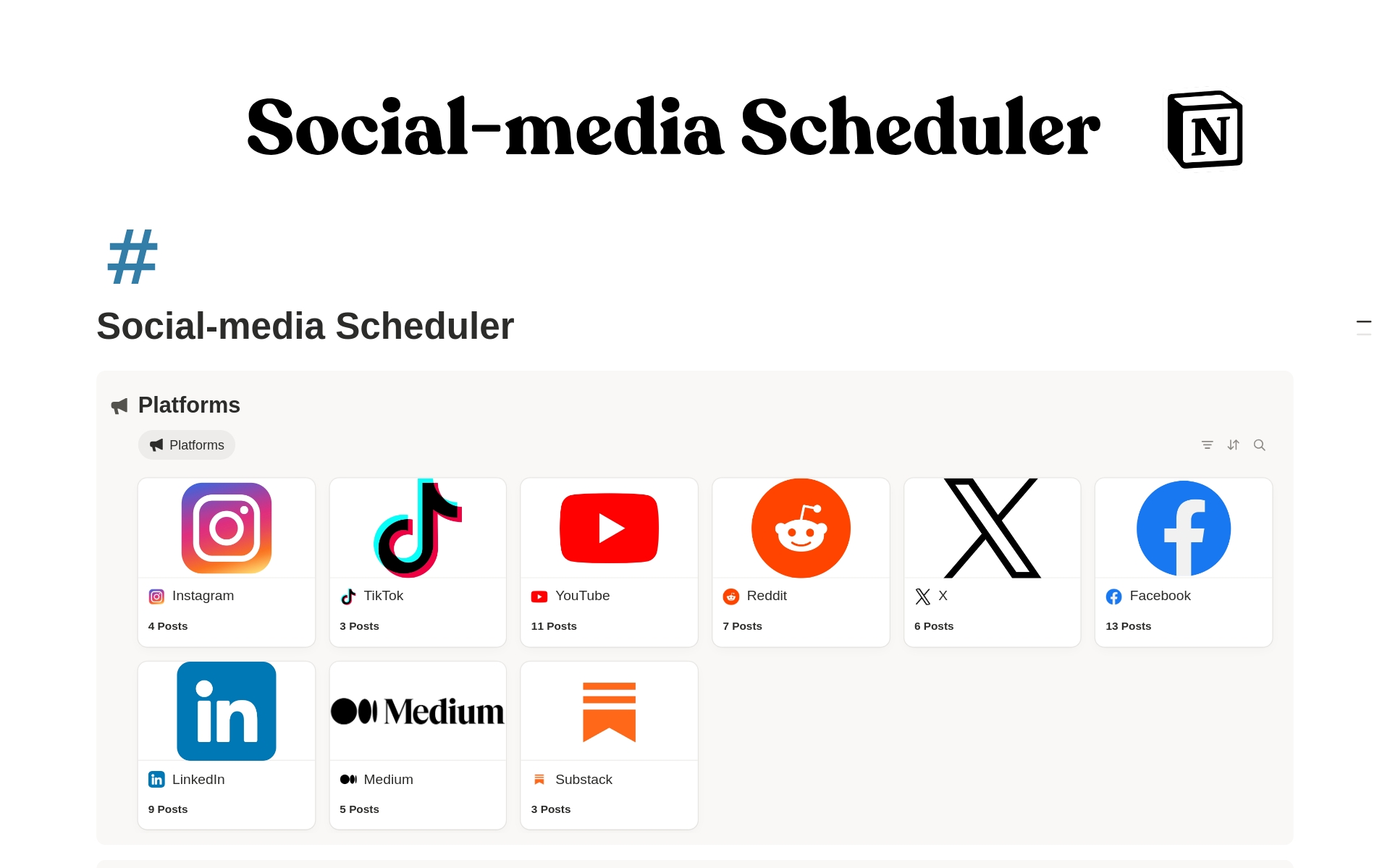
Multi-Platform Scheduler Organize content across platforms such as Instagram, TikTok, YouTube, LinkedIn, Facebook, Pinterest, X/Twitter, or any custom platform.
Content Planning Database Track post ideas, captions, formats, deadlines, publishing status, and related platforms.
Platform Management Database Store platform details, posting strategy, audience notes, and content focus for each channel.
Publishing Workflow Tracker Move each content piece through stages such as idea, draft, scheduled, published, or archived.
Simple Notion Dashboard Access your content and platform databases from one clean workspace.
Creator-Friendly Structure Built for daily use, not overcomplicated project management.
Customizable System Adapt the databases, statuses, platforms, and views to match your own content workflow.
Who It Is For
This template is ideal for:
Content creators
Influencers
YouTubers
TikTok creators
Instagram creators
Freelancers
Social media managers
Small business owners
Coaches and consultants
Digital product sellers
Personal brands
Marketing teams
Notion users who want a simple content planning system
It is especially useful if you publish on more than one platform and want a clear system to manage your content schedule.
What’s Included
Inside the template, you get:
Main Social Media Scheduler Dashboard
Platforms Database
Content Database
Content planning workspace
Platform tracking system
Publishing status tracker
Multi-platform organization structure
Customizable Notion database views
Clean dashboard layout
Beginner-friendly Notion setup
Reusable content planning system
You can customize everything to fit your brand, platforms, content types, and posting routine.
How It Works
Add your platforms Create entries for the social media platforms you use, such as Instagram, TikTok, YouTube, LinkedIn, or any other channel.
Capture your content ideas Add new post ideas to the content database so nothing gets lost.
Plan each post Assign the platform, content type, publishing date, status, notes, caption, or any other details you need.
Track progress Move posts through your workflow from idea to draft to scheduled to published.
Review your schedule Use the scheduler to see what content is coming up and stay consistent with your posting plan.
Customize the system Edit properties, views, statuses, and platform names to match your exact workflow.
Use Cases
You can use this Social Media Scheduler to:
Plan a weekly or monthly content calendar
Organize posts across multiple platforms
Track TikTok, Instagram, YouTube, LinkedIn, and Facebook content
Manage content ideas before they become posts
Plan product launches and promotions
Schedule creator content in advance
Organize client content if you are a freelancer or social media manager
Track published content for future repurposing
Manage content themes, campaigns, or recurring post types
Build a consistent posting habit
Requirements and Compatibility
Requires a free or paid Notion account
Works with Notion on desktop, web, tablet, and mobile
Compatible with Mac, Windows, iOS, Android, and browser-based Notion
No coding required
No paid Notion plan required for basic use
Can be duplicated into your own Notion workspace
Fully customizable after purchase
This is a digital Notion template. No physical product will be shipped.
Important Notes
This template is built for Notion.
You need a Notion account to use it.
After purchase, you will receive access to duplicate the template into your own workspace.
You can edit, rename, and customize the template after duplicating it.
This template does not automatically publish content to social media platforms.
It is a planning and organization system, not a social media automation tool.
Due to the digital nature of the product, refunds may be limited depending on the marketplace policy.
Call to Action
Start planning your content with more clarity and less stress.
Duplicate the Social Media Scheduler Notion Template today and build a simple, organized system for managing your posts, platforms, and publishing workflow in one place.
FAQs
What is the Social Media Scheduler Notion Template?
It is a Notion template designed to help you plan, organize, and track social media content across multiple platforms.
Do I need a paid Notion account?
No. You can use this template with a free Notion account.
Can I customize the template?
Yes. You can customize the databases, properties, statuses, views, platform names, and layout after duplicating it.
Does this template automatically post to social media?
No. This template helps you plan and track your content. It does not automatically publish posts to social media platforms.
Which platforms can I use it for?
You can use it for Instagram, TikTok, YouTube, LinkedIn, Facebook, Pinterest, X/Twitter, Threads, blogs, newsletters, or any custom platform.
Is this template beginner-friendly?
Yes. The structure is simple and easy to understand, even if you are new to Notion.
Can social media managers use this for clients?
Yes. Freelancers and social media managers can use it to organize content for their own brand or client projects.
Can I use this for content repurposing?
Yes. You can track content ideas, published posts, and platform-specific versions, making it easier to repurpose content across channels.
Will I receive a physical product?
No. This is a digital Notion template. Nothing physical will be shipped.
How do I access the template?
After purchase, you will receive a Notion template link. Open the link and click Duplicate to add it to your own Notion workspace.
Reviews
There are no reviews yet.
Only logged in customers who have purchased this product may leave a review.
Reviews
There are no reviews yet.